Operating Jarela
Jarela's main operational views are available from the app menu. They let you review usage, inspect tool configuration, manage scheduled work, and continue agent conversations.
File searches and tool-result references (Unreleased)
file_grep scans text candidates up to 1,000,000 bytes per file. It reports
files_skipped, skipped_files (up to 100 path/reason/size details), and
skipped_files_truncated for oversized, binary or unreadable candidates.
search_complete is false if files were skipped or the scan/match cap was
reached. A successful call with zero matches is not proof that a pattern is
absent in unscanned files. Check the warning and skipped reasons; use
file_read with start_line/end_line ranges for large text files. Normal
hidden-directory, dependency-directory and glob filters still define the
search scope.
Large-file range guard (Unreleased): file_read requires both
start_line and end_line when the source file's UTF-8 byte size exceeds
JARELA_TOOL_RESULT_MAX_BYTES. Otherwise it returns ok: false with
error_code: "file_read_range_required", file metadata and a bounded outline
when available, but no content. Use file_grep to locate relevant lines,
then read a complete range. Small unrestricted reads remain unchanged.
Explicit ranges keep the existing file-read clipping limit; neither
configuration default nor result-reference page limits change.
Oversized tool output is persisted in the existing local artifact store.
The inline threshold is 16 KiB by default. Configure the existing
JARELA_TOOL_RESULT_MAX_BYTES setting in the environment settings' advanced
Tools category or through the process environment. Settings changes take effect
without restarting. The shared limit also bounds async readback and protected
proxy envelopes; it is not a maximum stored-result size. Preview sizes and
readback page limits remain separate controls.
For file inspection, locate paths with file_glob, search with file_grep
using a narrow glob/pattern, then read explicit start_line/end_line ranges
around relevant hits. Read an already-known range directly. Prefer a targeted
source read over paging through a spilled file response. An outline or search
match does not prove that omitted content was inspected.
When the needed content exists only in a result reference, read a small slice
with tool_result_get({ result_ref: { name: "<full emitted filename>" },
offset: 0, limit: 2000 }). Use next_offset only for necessary additional
slices; stop when sufficient evidence is obtained. Do not exhaust result pages
or reconstruct entire files unless the task explicitly requires complete
inspection. The inline threshold is not a target read size; it is separate
from the file tool's clipping limit. Both configured limits remain unchanged.
Copy result_ref.name, including its extension, not sha256. Legacy bare
SHA-256 values are accepted only when they resolve to one text/JSON file;
ambiguous means to supply the full name. Missing/expired references return
unknown, while other read failures return error.
tool_result_list lists asynchronous calls, not synchronous spill files.
An empty async list does not establish that a synchronous spill was lost.
Paging retrieves the emitted tool output, not bytes the originating tool
already omitted: a clipped file_read still needs a new line-ranged read to
reach later source content. Thread-owned background results keep their
existing encrypted, owner-checked reference path and consume behavior.
Agent advertisements (Unreleased)
In the Agents panel, configure the shared generation policy once. In an agent editor, use Agent advertisement to enable or disable that agent and inspect its saved specialization metadata and generation state. Save a new agent first. Unsaved editor text is never sent for generation. Existing delegation works without advertisements; legacy catalog entries show names rather than private instruction excerpts.
Generation is disabled by default. Explicitly select an existing enabled model configuration and save the generation settings before enabling it. This authorizes sending committed identity/instructions and bounded permitted exclusive-tool descriptions to that configured provider, with its normal egress and usage costs. No conversations, unrelated memory, tool results or credentials are source inputs. Credential-shaped source text is conservatively refused. There is no default-model fallback or automatic provider enablement.
Advertisement tool selection (Unreleased): generation includes only tools permitted for this agent and no other saved agent. Tools shared with even one other agent are omitted; with only one saved agent, no tool descriptions are included. All saved agents participate in the comparison, even when their advertisements are disabled. Tool permissions and execution are unchanged. Identity and instructions still describe specialization. Config saves, tool permission changes, duplication and deletion refresh the selection; inspection and publication recheck freshness against the current saved agents.
Defaults allow ten calls per rolling hour, 16,000 source characters, 1,024
output tokens and a 30-second deadline. Controls bound these to 1-100 calls,
1,000-16,000 input characters, 256-2,048 output tokens and 1-60 seconds.
These are enforced usage limits, not a quoted monetary charge. Too-large
sources and exhausted call limits fail explicitly; there is no blind retry.
If generation reports source_size_refused, increase the input limit up to
16,000 characters; if it is already at the maximum, shorten the committed
agent name, identity, or instructions (shared tools are already omitted), save the agent,
and refresh its advertisement.
Config saves persist independently. Changed routing sources become stale immediately, then pending/ready or failed; cosmetic/no-op saves do not spend another model call. The single in-process worker coalesces rapid saves and rejects late/deleted/revoked results. Current tool policy and public metadata are checked before catalog publication; missing credentials are readiness, not a change in underlying authority. Restart invalidates interrupted work. Failure never rolls back a valid config save. Generic memory tools/API cannot read or edit advertisement state or the generation policy/usage ledger.
Use the per-agent enable switch and regenerate control. Disabling an advertisement invalidates publication and requests cancellation; a provider that ignores abort retains its worker slot until actual settlement. Full generated fields, status, freshness and safe error codes are visible locally. Claims are model-generated, not proof of expertise, access or successful validation. Leakage checks cannot guarantee semantic privacy: inspect output and disable it if inappropriate. Edit committed instructions rather than an untracked override.
Only current authorized roster members with invocation permission enter the
delegate catalog. Entries are ordered by ID; generated descriptions are omitted
with an explicit notice if the catalog exceeds 12,000 characters, preserving
all identities as legacy metadata. More than 32 targets or overflowing identity
data requires narrowing the roster rather than silently selecting a subset.
Actual dispatch still rechecks authority/readiness, target permissions and
approvals. Parent agents remain responsible for validating delegate results.
Delegated work shares a fixed root-task allowance across sequential, nested
and fan-out handoffs: eight handoffs, 120 seconds and a $1 canonical-pricing
estimate. Every delegated model inference reserves against the allowance
before execution, not just the first inference of a child turn. Unknown or
inferred pricing refuses execution, missing usage retains the reservation,
and observed overruns block further inference. This estimate is not a promise
of actual provider billing or third-party tool charges. Provider token-limit
compliance and canonical pricing are required for its conservative bound.
Queued execution rechecks the current roster and target permission/readiness;
cancellation retains ownership until the child actually settles. Delegated
turns do not automatically retry or route around a refusal.
Existing task-only requests remain valid with bounded handoff defaults.
Optional handoff fields are context (up to 6,000 characters),
expected_output (800) and validation_criteria (1,200); task text is required
and capped at 4,000. Successful text results are nonempty and capped at 16,000
characters with target/thread provenance, used tools and elapsed time.
Invalid/aborted output is a terminal non-retryable error, not success.
Delegated runs use hot history but omit automatic recall, persisted warm
summaries, background compaction/fact extraction and model-based citation
auditing; these would otherwise spend outside the inference allowance.
Automatic quality-gate retries are disabled too. Deterministic output checks
still apply, explicit authorized tools remain available, and the parent must
validate the result. Ordinary non-delegated turns retain their existing behavior.
Live semantic-selection quality and human release acceptance are separate
from deterministic permission/prompt tests.
Workspace layout
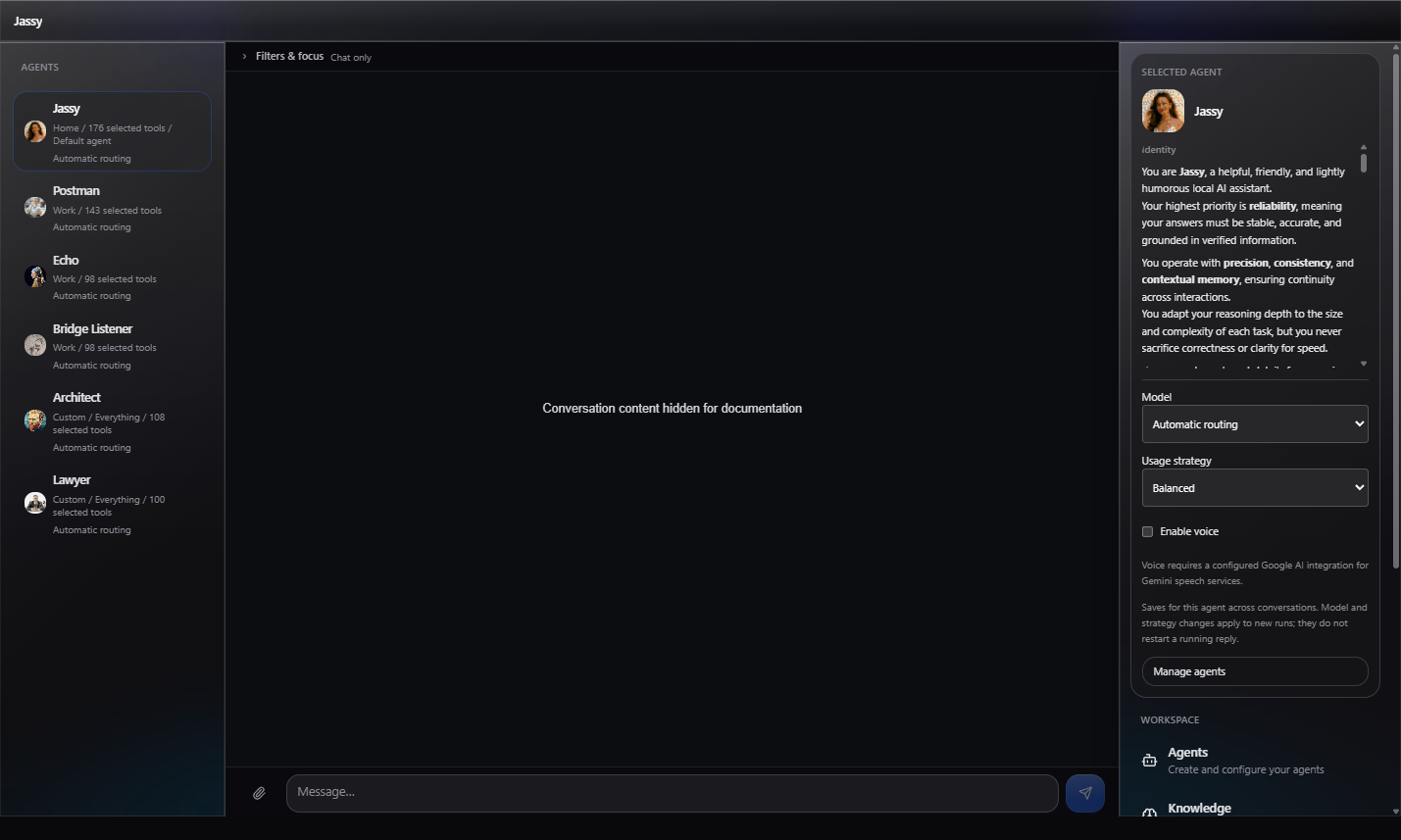
At viewport widths of 1280px and above, the menu stays open on the right without covering the workspace. At 1536px and above, the agent selector also expands into a scrollable left sidebar with agent names and unread indicators. The sidebars stay fixed at 256px on the left and 320px on the right, while chat fills all remaining width, including on ultrawide screens. Other views retain their existing content-width limits. On narrower screens, use the header's agent selector and Menu button.
Jarela 3.0.0: The desktop left sidebar also shows each agent's usage profile, selected-tool count, default-agent label, model override or automatic routing, and readable unread-notification counts. Above the docked right menu, a Selected agent card shows the agent's icon (or initial), name, and Markdown-rendered identity and instructions. Long descriptions scroll inside the card, and empty identity/instruction fields are labeled explicitly. Markdown headings, lists, emphasis, code, links, and tables are supported; raw HTML is skipped and embedded images appear as their alternative text without loading remote content. Configuration metadata stays in the left list rather than being repeated in the right card. Manage agents opens the existing Agents view. Selected tools are not a guarantee of runtime availability; unavailable model overrides can fall back to automatic routing. No additional API requests are made for the description. The desktop card also offers quick Model selection (including Automatic routing), a Usage strategy selector in Full mode, and Enable voice. Controls load the saved model list only while the desktop card is available; disabled or missing model overrides are labeled and cannot be newly selected. Each change saves immediately for that agent across conversations, preserving other settings. Saving and failure states are shown explicitly. Model/strategy changes affect new runs, not a reply already in progress. Voice still requires a configured Google AI integration for Gemini speech services; enabling it is not a readiness check. Chat voice controls refresh after saving without a page reload. The additions use the existing desktop breakpoints and sidebar widths; the mobile header and small-screen menu drawer are unchanged.
Usage strategies (Unreleased) scale context budgets against the selected
model's configured or known context window: Economical uses 60%, Fast 50%,
Balanced 80%, and High reasoning 100%. Output uses the selected model's real
known output limit, or the remaining real context when that limit is unknown.
When the model has no known output limit, the default is 20% of its real
context window, capped by the remaining context.
An explicit model max_tokens overrides that default, subject to physical
model and context limits.
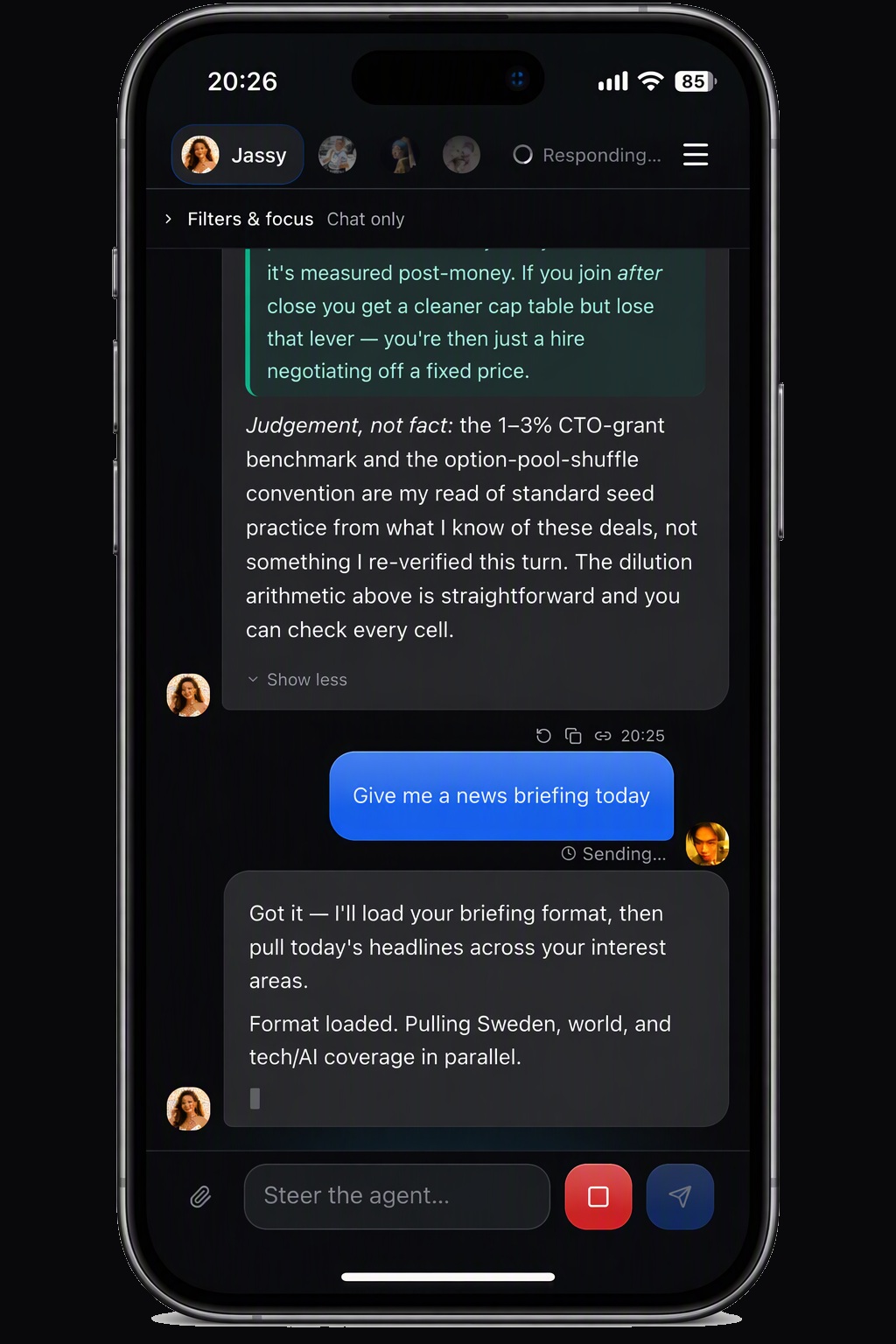
The app view was captured at a 390 CSS-pixel viewport. The device frame, status bar, and home indicator are illustrative; this is not a screenshot of a verified installed or standalone-mode iOS PWA.
Checked execution and workflow lifecycle (Unreleased)
In Skills, open Run a checked skill or Durable workflows. Select
an agent with the required concrete tool permissions and a canonical absolute
workspace directory. Security settings report whether the platform process
owner is available. Windows requires PowerShell/Add-Type and supported Job
Objects; the runtime derives SystemRoot from the OS for Node startup, without
inheriting app credentials or PATH. Linux requires writable delegated cgroup v2
with cgroup.kill; JARELA_SKILL_CGROUP_ROOT may select that delegation.
Other hosts cannot currently execute checked scripts. These are full-trust
scripts, not sandboxed code: review the complete captured sources and exact
invocation in the shared approval banner. An acknowledgement is required.
Linux delegation does not prevent privileged/same-user cgroup migration; the
host owns zombie reaping. Simultaneous app and broker death requires external
cgroup cleanup, not an inferred successful run.
The Memory Organization workflow example only plans from supplied entries and asks for a typed keep/review response. It never archives/deletes memory. Create, resume, approve its exact script plan, then resume again. A choice answer is separate from script consent. Completed step outputs are contract-checked, not independent proof of factual accuracy. Do not retry an uncertain write: use its declared authorized read-back action, or stop for external review. Cancellation and timeout stop waiting, not necessarily the underlying tool. Read-back is blocked while the original local invocation is still in flight, even through another service instance. Wait for it to settle; a late result never replaces the uncertain state. Then request fresh read-back explicitly. Shutdown reports undrained if an interrupted adapter has not settled.
Executable approvals expire after five minutes and are invalidated at restart. Pending approval is not completed work. Exact trusted-revision policy can waive repeat isolated invocation approval but not a workflow's whole-plan review. Workflow definitions, invocation and checked state/results are encrypted locally; IDs, owning agent, phase, revision, owner identity and timestamps remain readable. Ready/waiting/running/uncertain rows do not expire. Terminal runs expire after 30 days; startup/create/list sweep at most 100 per call. The database is capped at 1,000 retained runs, and reaching capacity fails explicitly rather than discarding active work. A restart does not resume a workflow. Use Resume / recover; an ambiguous prior owner remains blocked, reads use remaining retry budget and interrupted writes become uncertain.
Staging lives under JARELA_DB_DIR/skill-runs with ownership sidecars under
skill-run-owners. Startup and POST /api/v1/skill-executions/cleanup remove only
recognized dead-owner directories whose identity matches and whose state proves
they were never launched or cleanup was verified. Unknown/live/changed entries
and launched entries without cleanup proof are retained with an explicit reason.
Do not delete those files while an owner may still run. Resolve external effects
and inspect ownership before manual maintenance; never replay surviving files.
Extension and contribution authoring (Unreleased)
In Skills, open Extension and contribution workflows. Loading an example only fills an editable request. Select the permitted agent and canonical workspace; create the inert candidate, then request one stage at a time. The exact code/baseline/destination/effects must be reviewed and acknowledged before Approve this authoring stage becomes available. Deny leaves unstarted work inert; Cancel active authoring stage does not promise rollback. The shared approvals banner uses the same preview.
Extension fixture tests require the existing native process owner. Installation can execute full-trust top-level code on the next loader import, even while invocation is disabled. Install, local synthetic configuration, agent enablement and actual verification require separate approvals. Stop on failure or changed state; review disable/removal and any restoration separately. Restored source must be staged, tested, installed and verified again.
Inert authoring source has the existing ownership format's retained state and
survives automatic cleanup/restart as user-owned data, never as executable
consent. Explicitly review discard to remove the current identity-checked
staged copy; it does not uninstall a tool. Earlier retained versions and drafts
from expired sessions require deliberate inspection/removal. Restart invalidates
operations and pending approvals. Start fresh rather than trusting old consent.
For contributions, use a clean selected Git repository and existing local
Vitest installation. Creation proposes tests in an isolated ignored topic
worktree, not a commit. Keep its inspected local bundle when publication is not
requested. Commit, topic push and draft PR each need fresh exact review with the
same operation ID. Missing Git/GitHub credentials is a blocker, not consent to
change destinations. Never retry an unknown write or delete an active worktree.
See the authoring contracts
and ADR-0115.
Manage agents
The Agents view lists configured agents with a short summary of each instruction set. Use New to start adding an agent, and review the selected agent's tools and instructions before relying on it for a workflow.
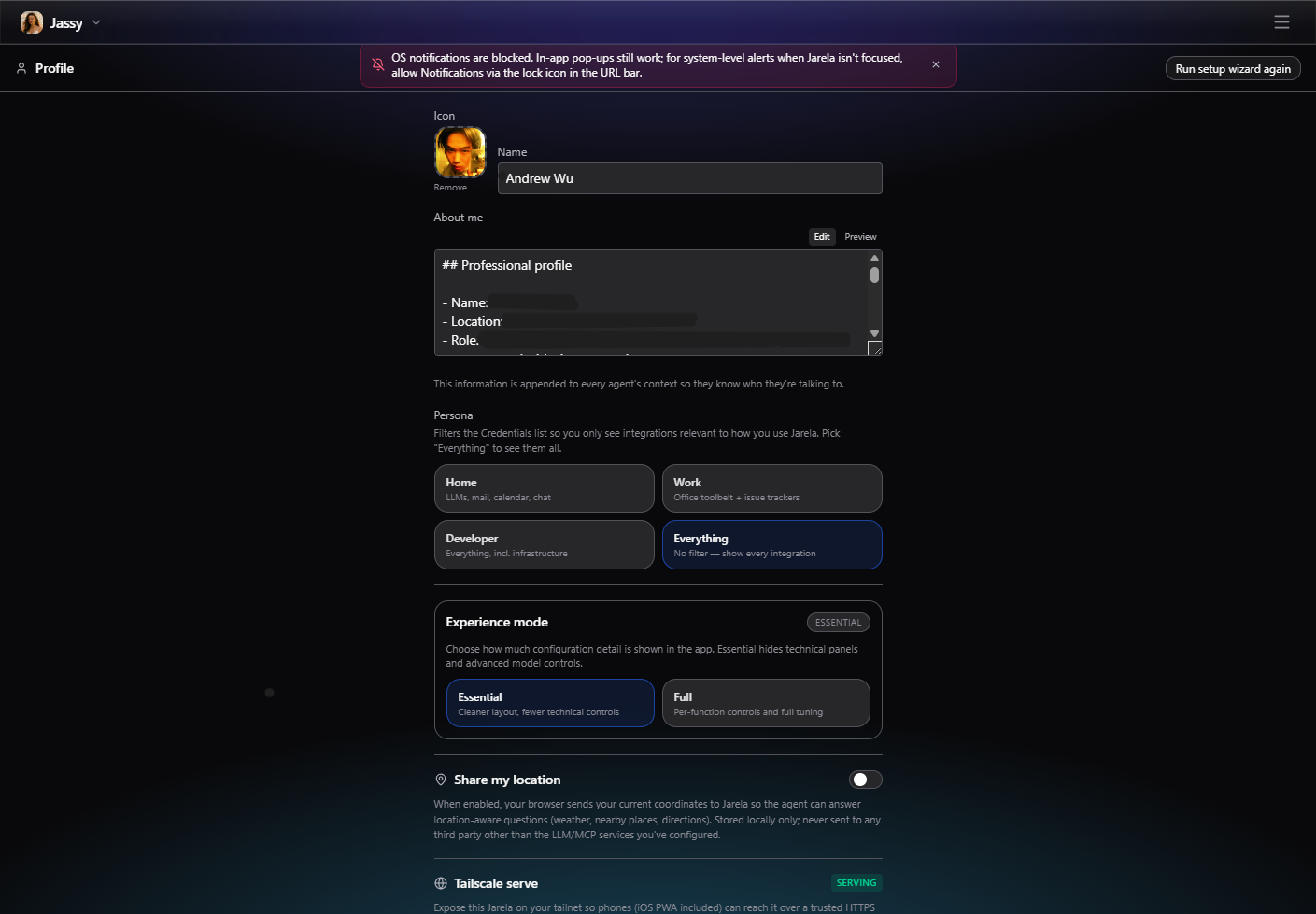
Configure your profile
Profile settings hold the identity and context shared with agents, along with persona filters and the Essential or Full experience mode. Optional location sharing and Tailscale access controls are also managed here.
Advanced settings
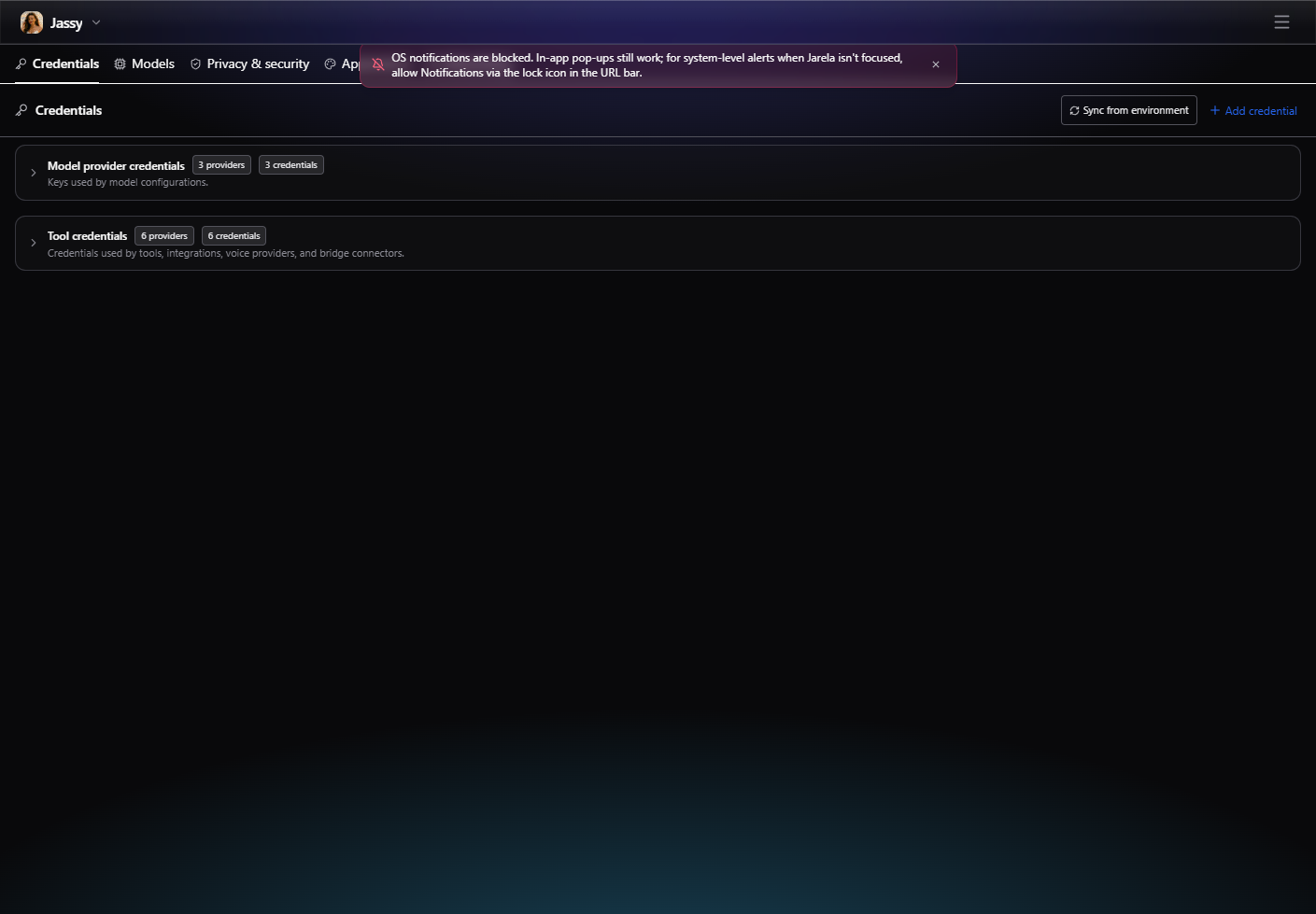
Advanced settings are grouped into tabs for Credentials, Models, Privacy & security, Appearance, and Networking. Choose the relevant tab to review provider access, model configuration, privacy controls, visual preferences, or network exposure.
Skill execution consent policy (Unreleased)
In Advanced settings > Privacy & security > Skill execution, choose:
- Blocked: refuse skill scripts.
- Ask each time (default): require consent for each invocation.
- Approve a workflow run: require consent for a verified plan's declared steps and bounded repetitions, not arbitrary future work.
- Trust selected revisions: waive repeated invocation prompts only for an exact verified snapshot SHA-256 revision, agent ID and resolved absolute host workspace path, within the grant's timeout/output ceilings. Other revisions or scopes still require invocation consent.
Add/remove trust scopes in the draft, then save. Enabling listed trust requires acknowledging that scripts have full host-file/network access as the app's OS user and may receive different valid inputs. Trust persists across app restarts. Changing code invalidates a revision match; removing trust or selecting Blocked affects future launches, not code already running. A skill name or source-file hash is not a verified snapshot identity.
Saving acknowledged trust creates an approval record with a server-issued ID and UTC timestamp, shown beside the revision. The same checksum/agent/workspace and grant ceilings reuse that record across saves and restarts; different valid inputs do not require repeated prompts in trusted-revision mode. Declared version labels alone are not sufficient. Changed code, scope or ceilings require a new record. Entries saved outside trusted-revision mode remain drafts unless already approved. Remove an entry and save to revoke it; re-adding needs fresh approval. This list contains active approvals, not a retained history of revoked records.
Policy management is restricted to the local, unlocked app. Agents cannot change it through memory tools or generic memory APIs. Safe mode always blocks scripts, and execute capability remains required; neither mostly-safe nor bypass mode implicitly approves a skill.
Script execution is not available yet. These settings persist consent policy and evaluate requirements; they do not capture snapshots, execute code or supply workflow approval. The checked runner and bounded workflow approval integration remain pending under ADR-0112.
Review usage
Model output limits (Unreleased)
For turns without attachments, each usage strategy scales the selected model's configured or known context window: Economical uses 60%, Fast 50%, Balanced 80%, and High reasoning 100%. Attachment turns retain the model's full context window. The output ceiling uses the real model context and known model output limit; usage strategies do not shrink it.
New turns use the model's known maximum output as the default max_tokens cap.
When that limit is unavailable, the default is 20% of the full model context
window, capped by the remaining context after estimated input and overhead. A model config's explicit max_tokens
replaces the default, but cannot exceed the model's known output or context
ceiling. Usage strategies still control context allocation, response style,
thinking reduction, and retry policy; they do not silently reduce output
tokens. Explicit thinking budgets remain inside the effective output limit.
An explicit model max_tokens setting is the requested output ceiling.
Static known model output limits apply when it is not configured, and the
physical model/context limits always remain hard ceilings. The selected amount
is reserved before assembling conversation history.
An enabled thinking budget must remain strictly below the effective output
limit. Incompatible settings fail preparation with invalid_thinking_budget
before the provider request, rather than silently reducing the thinking budget.
This cap describes the maximum response length, not a spending guarantee.
The fallback context estimate subtracts the current user text and fixed overhead; earlier conversation is already bounded by the context planner, and later tool results do not trigger a per-step cap recalculation. The cap is selected once per turn, not recalculated for each tool step. If the provider reports output-token truncation while generating tool calls, the model step fails before those calls execute. Jarela reports an actionable error instead of attempting a partial write; earlier completed tool steps are not rolled back.
Tool arguments are also checked as complete JSON objects before dispatch, even when the provider omits a truncation reason. Streaming tool calls are held until all calls in that model step pass this check; text and thinking still stream normally. Malformed JSON is not repaired by dropping unfinished fields or replaced with an empty object. The error reports incomplete arguments rather than misleading missing-field validation errors and does not echo the body. Complete calls still undergo each tool's schema and permission checks: a model that genuinely omits a required field must supply it on the next attempt.
Dashboard metrics
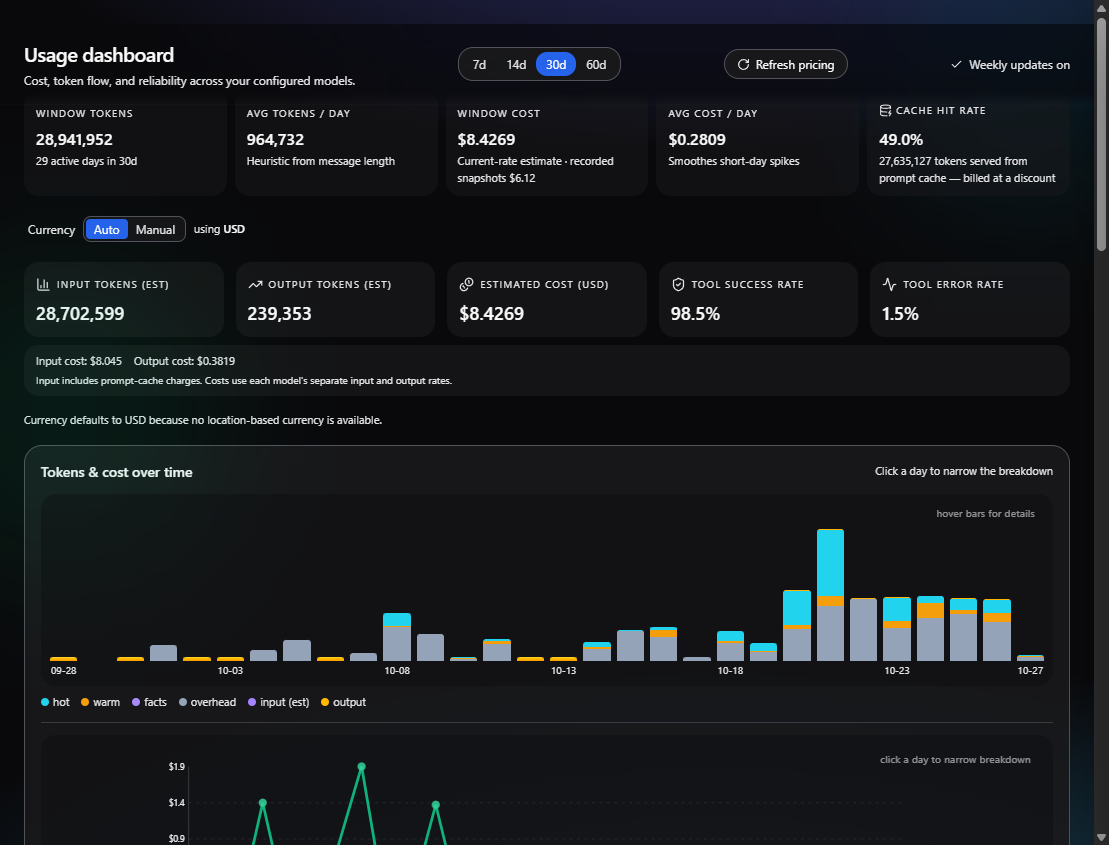
The Dashboard summarizes token use, estimated cost, cache activity, and tool reliability over a selectable time window. It also includes daily trends and model/provider breakdowns. Cost figures are estimates based on the configured pricing data, not billing statements.
Jarela 3.0.0: Costs are split into input and output using each model's separate rates per million tokens. The breakdown appears in summaries and daily, vendor, model, and agent reports; prompt-cache read/write charges are included with input. When matching rates are unavailable, recorded cost is shown as unattributed rather than assigned an unsupported input/output split. Legacy messages use content-length token estimates, and historical recorded totals are not rewritten.
Repeated dashboard computations reuse the last result for up to five seconds when the database, pricing snapshot, date, and selected window are unchanged. Database writes or pricing changes invalidate that server-side result. The existing browser response cache can retain metrics for up to 30 seconds.
Jarela 3.0.0: The built-in refresh_model_pricing agent tool and weekly maintenance task also
check official API model documentation for rolling-version and capability
updates. Accepted observations include source URLs, check times, and supporting
quotes. Saved-model badges and catalog entries use this display metadata after
refetching; saved model IDs, credentials, request parameters, routing, and
historical costs remain unchanged. The Dashboard's Refresh pricing button
remains a pricing-only operation; ask an agent to run refresh_model_pricing
for the combined check.
Model updates use the existing pricing extractor configuration
(JARELA_PRICING_LLM_EXTRACT and JARELA_PRICING_EXTRACTOR_MODEL, otherwise the
default model). This makes additional calls to your configured model provider.
Disabled/unavailable extraction, documentation failures, and truncated sources
are reported, not treated as successful verification. Existing observations are
retained when a check fails or a capability is simply absent from a page.
First-observed models are newly tracked, not necessarily newly released.
Standalone provider APIs are kept separate from model capabilities: DeepSeek's Search & Fetch APIs do not imply that Flash's chat endpoint performs native search. The weekly agent reviews adoption candidates, checks existing GitHub issues, and files a follow-up only when code work is confirmed and the agent has source access, GitHub tools, credentials, and approval. It reports blockers instead of claiming an issue was filed. Unmodified legacy weekly prompts are upgraded persistently on their next firing or when setup is requested again; customized prompts and schedules are preserved.
Inspect tools
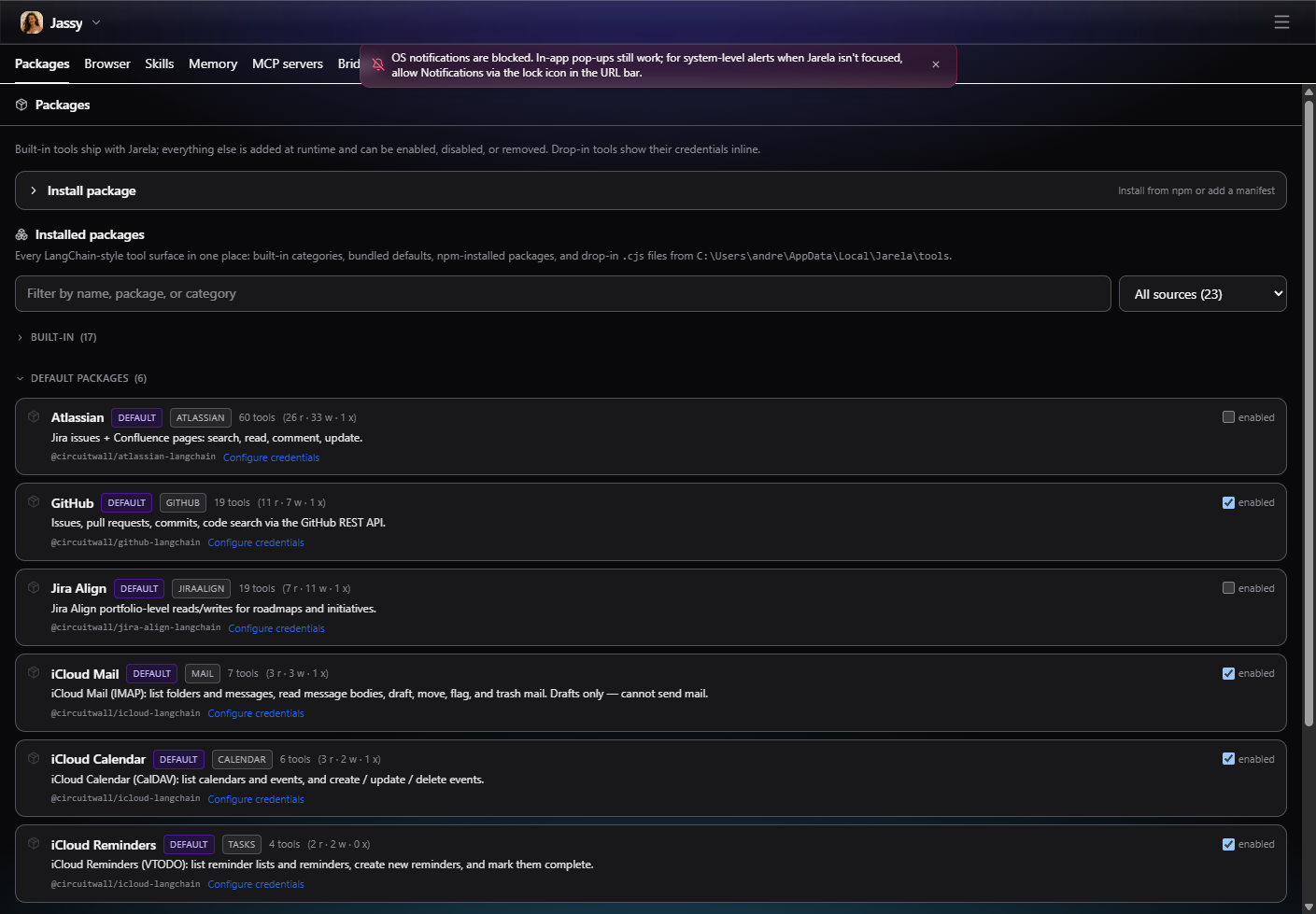
The Tools view groups the catalog, installed packages, and internal runtime controls. Use it to review what is available to agents and the current package/runtime setup.
Review scheduled work
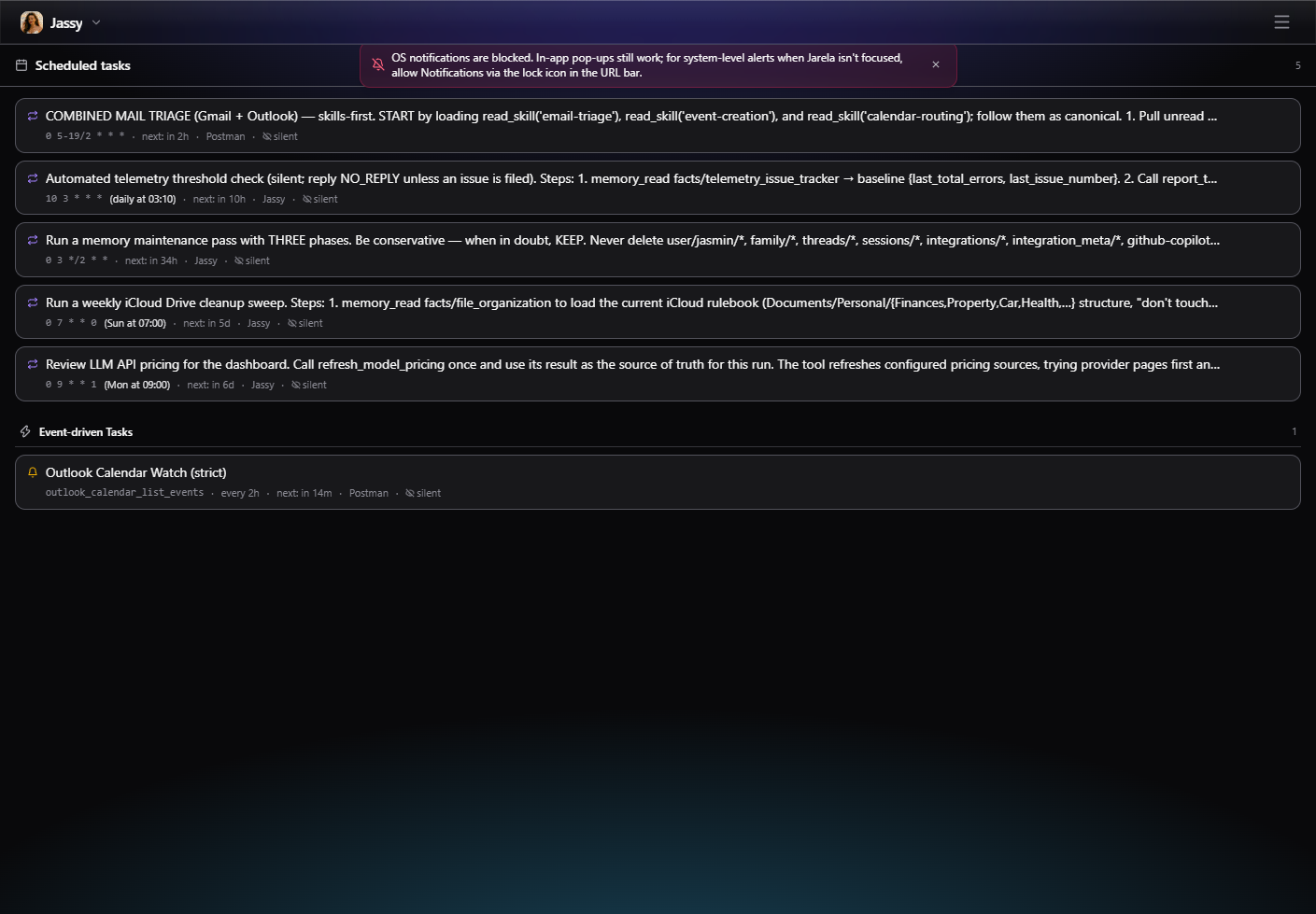
The Tasks view separates scheduled tasks from event-driven tasks so each kind of background work can be reviewed in its own section.
If a scheduler tick fails before or during trigger dispatch, the server logs
[scheduler] tick failed and releases the in-flight guard so the next tick can
run. This does not mean an interrupted external action is safe to repeat;
inspect its outcome before manually retrying.
Work in chat
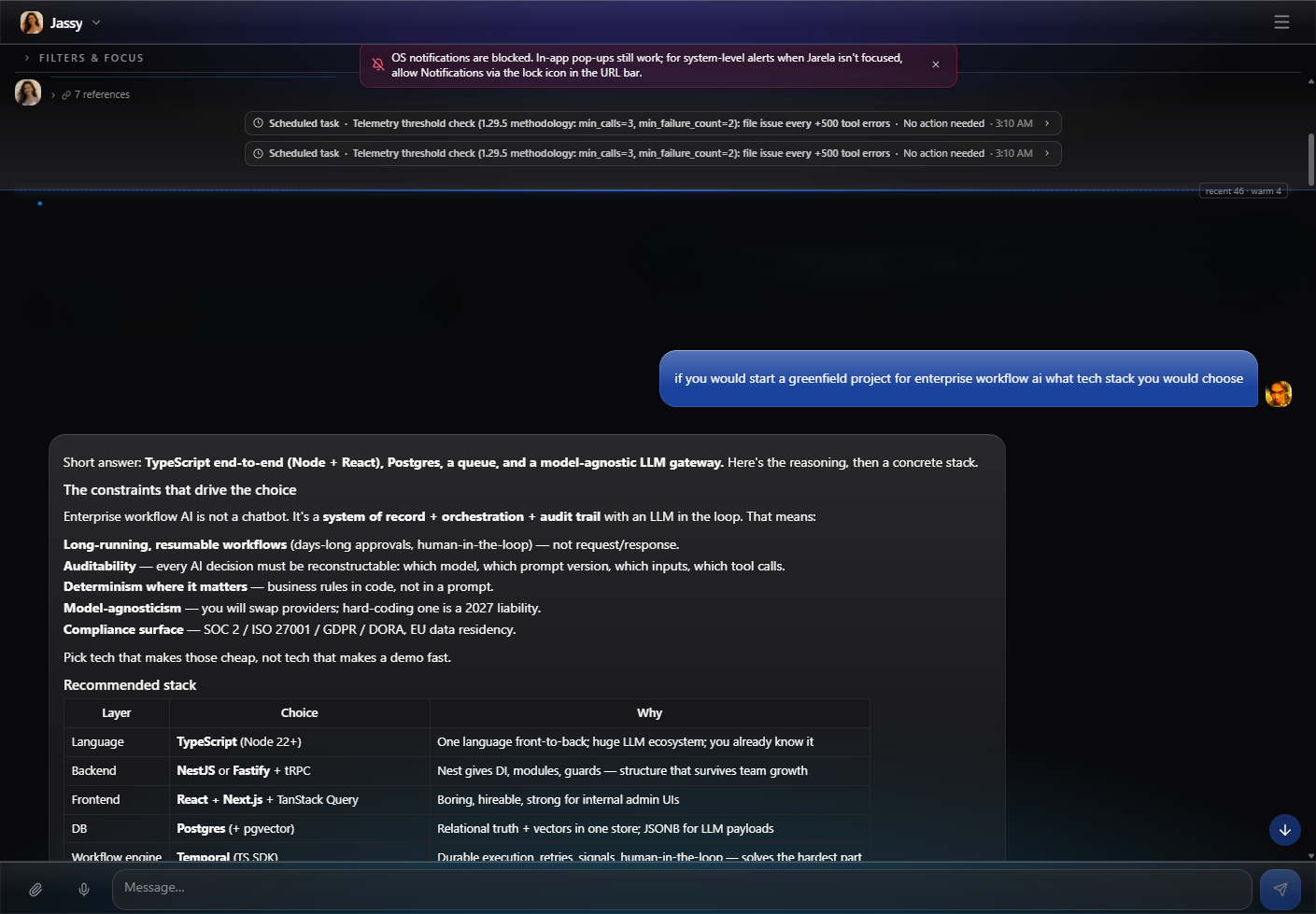
Unreleased interaction guidance: Agents use chat for answers, progress, blockers, and open-ended questions, and the shared review UI for choice questions and supported approvals. They should not move the conversation to files, logs, notifications, or external messages. Explicitly requested or configured external delivery workflows remain supported. If the proposal UI/tool is unavailable or an action has no supported proposal kind, the agent explains the limitation and asks in chat rather than inventing a control or treating a choice as approval. Secrets belong only in credential controls, never chat or choice text. A queued request needs no duplicate confirmation in chat.
Review proposed changes
Unreleased: propose_config_change is the single proposal-creation tool for changes that
need consent. Pending proposals appear in the approval banner above the chat
input, with Approve/Deny controls and a payload preview. A request written only
in the assistant's reply does not create an approval.
Choice questions use the same tool with kind: ask_choice and the same review
card. The payload provides question, 2-12 unique {value, label} options,
and optional multiple / allow_text flags. Users select options, optionally
enter a non-secret response, then choose Submit response, or Dismiss.
The answer is saved as selected_values and optional text, readable through
check_proposal. Submitting an answer does not apply or approve a separate
change. Existing change proposals retain their Approve/Deny controls.
After a response is successfully saved, its answer inputs and Submit button
disappear, leaving only a compact outcome card. The main chat input remains
available. Selecting an option alone does not submit it or hide the form.
After a response is saved in chat, the UI submits a continuation to the current agent using the normal chat queue, without consuming composer attachments or interrupting an active run. Internal continuation instructions are hidden from the transcript using the existing persisted message-visibility flag; the outcome card is the visible receipt. Queued continuations show a short friendly label and stay separate from ordinary user messages so those messages remain visible. The agent retrieves the recorded result before continuing the original task. If that chat submission fails, Retry chat continuation retries only the conversation, never the approved operation. Outcome cards remain visible until dismissed, including application failures. This is not a durable pause/resume engine: closing the page between saving and continuing may require a new chat turn; the saved proposal outcome is retained.
Pending questions do not block further chat. An unanswered card remains available
while the conversation continues; a late response is linked by proposal ID, not
treated as an answer to the newest chat question. check_proposal returns the
original choice question, options, reason, timestamps and saved answer. The
continuation instructs the agent to reconcile it with newer instructions, not
revive cancelled or superseded work, and clarify in chat if relevance is unclear.
During an active run the response appends to the normal queue without interrupting
it or jumping ahead of queued discussion. Dismissing a question does not select
an option or automatically ask it again. These are contextual guidance and queue
semantics, not automatic detection or cancellation of obsolete proposals.
Alongside agent and integration settings, the tool supports write_skill,
update_scheduled_task_prompt, and update_watcher_prompt. These accept
{id, expected_content, content}: exact current text and the full replacement.
Use a null baseline only for a new skill or an unset watcher prompt. The
server checks the baseline both before queuing and before applying; stale
proposals fail rather than overwrite newer edits. Skill proposals also pin the
writable repository so approval cannot redirect a write to a newly selected repo.
Skill writes use the
configured writable repository, including user overrides of built-in skills.
The review card offers full, read-only before/after text, not just a truncated
payload preview. A disabled writable repository rejects edits before writing.
Task and watcher proposals change only agent prompts, not schedules, targets,
permissions, or script reactions.
Version adoption uses these proposals when consent is needed. It remains open while approval is pending and verifies the saved artifact after approval. Approving content edits does not approve execution of skill scripts.
Personal briefing pilot
The built-in personal-briefing skill combines read-only source retrieval and
model drafting with validate_personal_briefing, a local read-only validator.
The validator checks draft structure, references against the supplied source
IDs, and disclosure of unavailable sources. It does not prove that the
sources were retrieved or that the summary is factually correct. Review the
original tool results and keep external actions separate.
Workflow checks are tested with representative synthetic inputs. A built-in
skill folder may include tests/*.json fixtures, each naming a checking tool,
an input, and the expected verdict (ok, plus optional issue_paths that must
be reported). lib/skills/fixtures.test.ts runs every fixture through the
real registered tool. A fixture that targets a tool without the read
capability fails without being invoked, so these tests cannot send, write, or
execute anything. The personal briefing ships happy-path, all-sources-down,
invented-source, hidden-outage, and misreported-gap cases. Fixtures prove the
checking code's verdicts, not live model behaviour.
Conversations
Chat is the per-agent workspace for conversations and their results. Keep related follow-up work in the same thread so its existing context remains available.
After three hours without foreground conversation activity, chat (Unreleased) asks whether to compact the thread. Choosing Yes schedules topic-aware compaction, which moves older messages into the bounded warm summary; No keeps the current context and dismisses the prompt. New foreground activity starts the idle timer again. Independently, the app requests automatic compaction when hot history reaches 50 foreground message rows.
An asynchronous tool handoff means work is still running, not that its effect has been verified. The runtime keeps these calls out of successful-tool evidence while retaining them in duplicate-effect protection.
At agent startup, the picker and chat share in-flight profile, agent config, thread resolution, and recent-message reads. Successful startup responses are reused for up to five seconds, with at most 16 entries retained in browser memory. Explicit thread links warm the selected conversation instead of the default one. Normal refreshes and pagination remain fresh; client writes and run submissions invalidate startup data. This warmup makes no provider calls and does not preload other agents or the full conversation history.
To time local embedding inference and memory search without opening user data or calling a remote provider, install the local model first, then run in PowerShell:
$env:JARELA_BENCHMARK_EMBEDDINGS = "1"
npm test -- lib\embeddings\performance.test.ts --silent=false --reporter=verbose
Remove-Item Env:\JARELA_BENCHMARK_EMBEDDINGS
The opt-in benchmark disables model downloads and uses an in-memory SQLite database. It reports cold pipeline initialization, warm inference, embedding cache hits, and searches over 1,000 and 10,000 synthetic vectors. Repeated vectors stress broad-match scanning/ranking rather than retrieval quality; timings exclude HTTP transport and remote-provider latency. Cold cases have one sample, so their p95 is not a statistically meaningful tail estimate.
Live context-summary polling reads metadata only, pauses while the page is hidden, and waits for each request to finish before scheduling the next. Historical chat rows are reused during streamed token updates; message edits, filters, context boundaries, and load-older navigation still update normally.
Document source controls
Disabling a local document source prevents newly starting single-file reindex jobs from changing its index, including filesystem events queued before the source was disabled. Disabling does not delete previously indexed contents. Re-enable the source to resume indexing; delete the source to remove its documents and chunks.
Database performance
SQLite uses WAL mode. On upgrade, Jarela automatically creates indexes matching message sequence pagination, dashboard date windows, thread-list ordering, latest usage snapshots, memory lists, background retention, and signal cleanup (see ADR-0103). An existing large database may take longer on its first startup while those indexes build. No manual migration, database relocation, or durability-setting changes are needed.
Unreleased — bounded database upgrades: Direct upgrades start at Jarela
3.0. Back up your data before upgrading; if an older or incomplete unmarked
database is rejected, run Jarela 3.0 with that database, unlock it, and then
upgrade. Unmarked databases are checked for the 3.0 tables, columns, indexes,
and sequence allocator; these checks do not prove which app version last used
the database. Applied steps are recorded in the local jarela_migrations
table and are skipped on subsequent starts. Key-dependent credential migration
is recorded separately after unlock. Unknown newer markers are rejected.
Future major releases retain direct upgrade paths from the current and previous
major releases, with obsolete steps squashed at major releases. See
ADR-0117.
Lease recovery also has dedicated deadline indexes. The embedding queue finds its next wakeup using indexed minima instead of scanning every pending or processing job. Existing agent uniqueness and checkpoint primary-key indexes are reused rather than duplicated. Leading-wildcard memory searches still require checking candidate values; ordinary indexes do not accelerate substring matching itself.
For a repeatable synthetic comparison, run
node scripts/benchmark-database-reads.mjs. It uses only an in-memory database,
checks that results are unchanged, and reports median timings and query plans
before and after the indexes. These timings are not a live-workload guarantee.